
This follows on from my adventures in trying to centralise my AI stack, making it easier to jump between Claude, Chat-GPT or Cursor.
I use more than one AI coding agent. Codex and Claude Code are the main ones, but Cursor, Gemini and others also pass through my setup. That flexibility is useful—until every client becomes its own configuration island.
The first few integrations were easy. Add an MCP server to one client, copy roughly the same configuration to another, restart both and move on. Skills followed the same pattern: put a SKILL.md in one agent’s directory, then copy it wherever else I wanted it.
That approach does not scale. Before long, I was managing the same capability in several places and could no longer answer a basic question with confidence: what is the source of truth?
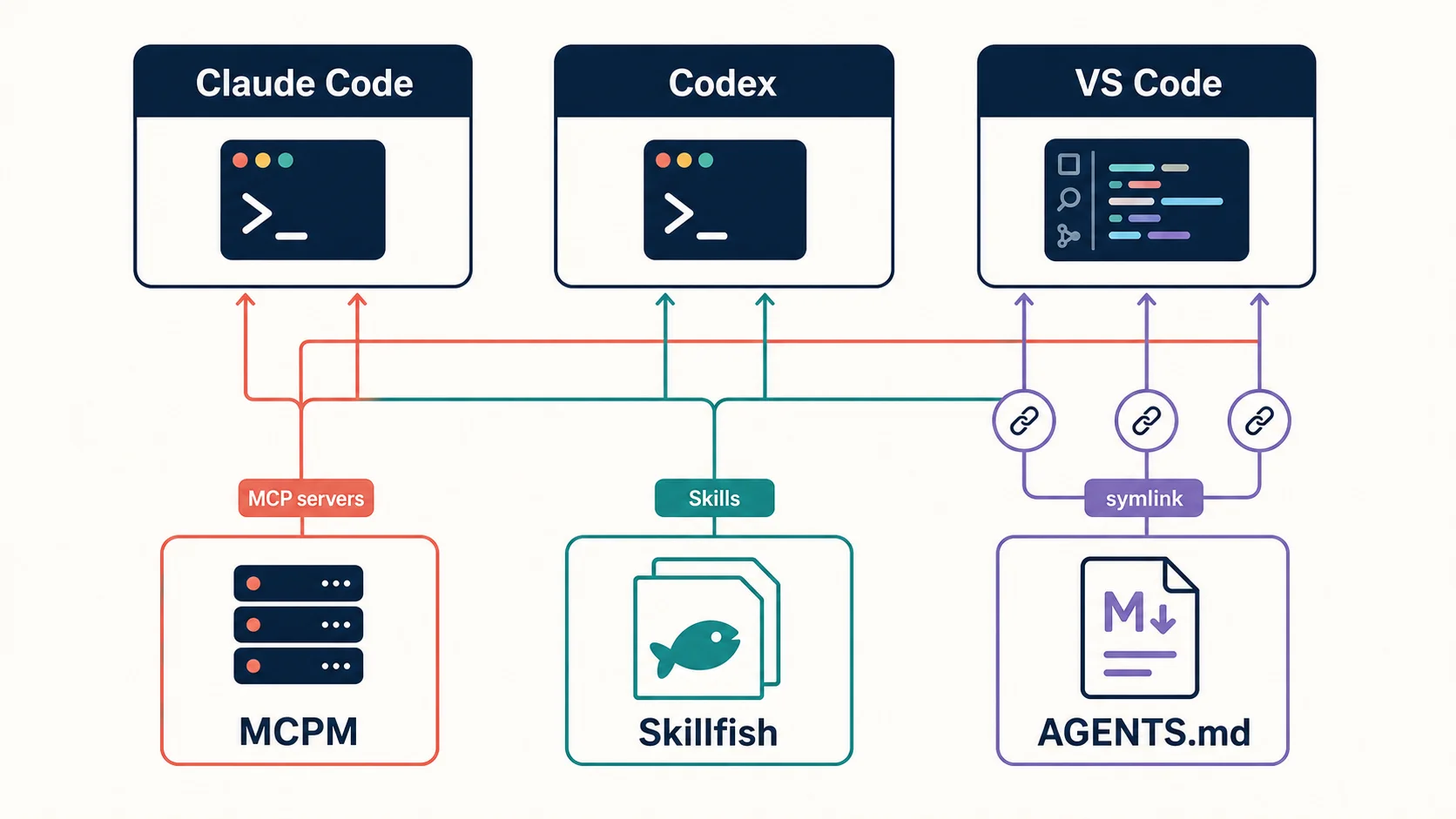
I eventually chose two small, focused tools: MCPM for MCP servers and Skillfish for agent Skills. Together they give me a consistent management layer without locking me into a single agent.
Together they allowed me to finish my toolkit:
- Mem0 as the brain.
- MCPM to manage MCP integrations
- Skillfish to share Skills between agents
- Symlink the icing on the cake. Allowing me to maintain my AGENTS.md/CLAUDE.md from one place.
The problem was configuration drift, not installation
My chat history shows the problem accumulating in stages.
I had MCP definitions spread across Codex’s configuration, Claude’s user and project files, plugin-managed definitions and account-level integrations. When I backed everything up before a clean-up, there were six MCP-related configuration files to preserve.
I also found duplicate Mem0 definitions. The ordinary Claude entry matched Codex and worked, while a plugin-managed copy still pointed at a different hosted endpoint and failed. Removing Bifrost meant editing both Codex and Claude configurations separately.
A health check found connected servers, servers waiting for authentication, a dead duplicate and account-level connectors that the local CLI could inspect but not remove. Each client had a slightly different model for transport, scope, authentication and ownership.
None of these issues was difficult in isolation. The cost came from repetition and ambiguity. A simple change had become an inventory exercise followed by several edits and several verification steps.
Skills were heading in the same direction. Each agent expects Skills in its own directory. A useful workflow such as todoist-worker may need to appear in Claude Code, Codex, Cursor, Gemini, OpenCode and other agents. Manual copying turns one workflow into many unmanaged copies.
The real requirement was therefore not another installer. I wanted a control plane: one place to discover, add, update and remove capabilities, with adapters that respected each agent’s native layout.
What I considered for MCP management
My first research covered ToolHive, MCPJungle, Docker’s MCP gateway and lightweight gateway projects.
ToolHive was compelling for container isolation and local runtime security. MCPJungle was attractive as a persistent shared gateway, particularly for services hosted on Unraid. Docker’s approach fitted container-heavy environments, while smaller gateways promised to reduce tool-schema overhead.
Those products answered a broader runtime or gateway question. My immediate problem was more prosaic: I wanted to install a server once, keep its definition in one place and expose it to multiple local clients without hand-editing every client file.
That distinction led me to MCPM.
Why MCPM fitted my workflow
MCPM describes its model as global server management: install once, organise servers into profiles and integrate them with individual clients. That matched the shape of my problem almost exactly.
The key design detail is the launcher. MCPM does not need to copy the full server definition into every client. It can install a small client entry that runs:
mcpm run server-nameThe server’s command, URL and environment remain in MCPM. Claude Code and Codex only need to know how to call MCPM. Changing the underlying endpoint no longer requires editing both clients.
This worked with the transports I actually use. A LAN-hosted HTTP server could be registered as a remote server, while Auth0 or Unraid could be registered as local stdio commands. Both could then be enabled for Claude Code and Codex through the same client-management workflow.
MCPM also gave me the operational commands I was missing: search, install, inspect, run, update and doctor. Profiles let me group servers by purpose rather than enabling every tool everywhere. Its non-interactive and JSON modes make the same model usable in scripts.
Most importantly, it was a thin management layer, not a demand to redesign my environment. I could keep local servers local, connect to services on Unraid and still let each client use its own native features where necessary.
OAuth is the clearest example. For a server whose OAuth flow is best handled by the client, I can bypass the MCPM proxy and let Claude Code or Codex authenticate natively. Account-level Claude integrations also remain account-level. Centralisation should remove duplication, not erase useful boundaries.
Why Skillfish completed the picture
MCP servers give an agent tools and access to live systems. Skills give it repeatable instructions, domain knowledge and workflows. They are different kinds of capability, but their management problem is almost identical.
Skillfish installs Skills from GitHub and places them in the directories expected by the agents it detects. One command can target Claude Code, Codex, Cursor and many other agents without requiring me to remember every path.
That is the practical reason I chose it. On my machine, Skillfish currently detects 17 agents. Its inventory shows the same reusable Skills distributed across several of them. I can list, add, remove and update those Skills from one CLI instead of auditing each directory manually.
The manifest workflow is especially important. skillfish bundle can create a skillfish.json inventory, and skillfish install can reproduce it. The manifest can be version-controlled, reviewed and used to bring another machine or teammate into the same declared state.
Skillfish also covers the rest of the lifecycle: registry search, GitHub installation, updates, removal and the creation of new Skills. JSON output and non-interactive behaviour make it automation-friendly.
As with MCPM, this is a management layer rather than a new proprietary format. The installed artefacts remain ordinary SKILL.md packages in each agent’s native location. If I stop using Skillfish, the Skills do not suddenly become unreadable.
Centralising AGENTS.md with symlinks
Skills handle reusable workflows, but some rules should apply to every task: safety defaults, Git practices, verification standards and instructions for persistent memory.
Codex loads global instructions from ~/.codex/AGENTS.md. Claude Code uses ~/.claude/CLAUDE.md for the equivalent user-level rules.
Rather than maintain two copies, I keep one canonical file at ~/dotfiles/AGENTS.md. Both clients point to it through symbolic links:
mkdir -p "$HOME/dotfiles" "$HOME/.codex" "$HOME/.claude"

# Create and edit the canonical instructions first.
${EDITOR:-vi} "$HOME/dotfiles/AGENTS.md"

# Back up any existing client-specific files before continuing.
backup_suffix=$(date +%Y%m%d-%H%M%S)
for path in "$HOME/.codex/AGENTS.md" "$HOME/.claude/CLAUDE.md"; do
  if [ -e "$path" ] || [ -L "$path" ]; then
    mv "$path" "$path.$backup_suffix.backup"
  fi
done

# Link each client to the same source of truth.
ln -s "$HOME/dotfiles/AGENTS.md" "$HOME/.codex/AGENTS.md"
ln -s "$HOME/dotfiles/AGENTS.md" "$HOME/.claude/CLAUDE.md"
The backup loop also handles existing or broken links and gives each backup a timestamp. I verify the result with:
ls -l "$HOME/.codex/AGENTS.md" "$HOME/.claude/CLAUDE.md"
readlink "$HOME/.codex/AGENTS.md"
readlink "$HOME/.claude/CLAUDE.md"
This makes a change to my global working rules available to both agents immediately. I restart active sessions because instruction files are normally loaded when a session starts.
The canonical file belongs in a private or carefully reviewed dotfiles repository. It should contain durable working rules, not credentials, machine secrets or project-specific details.
Repository-level AGENTS.md and CLAUDE.md files should remain inside their projects. They can add or override local conventions while the symlinked global file supplies the shared baseline.
A broken symlink is easy to miss and may leave an agent without its expected instructions. Keeping the target path stable and checking links after moving a dotfiles directory avoids that failure mode.
Why I chose the pair rather than one larger platform
The pairing is deliberately boring:
- MCPM manages what my agents can connect to and do.
- Skillfish manages how my agents approach recurring work.
That separation follows the underlying standards. MCP servers are running integrations with transports, credentials and failure modes. Skills are portable instruction packages, sometimes with scripts and supporting resources. Treating them as one product would blur two very different security and lifecycle models.
Both tools also preserve agent choice. I can use Claude Code for one task and Codex for another without rebuilding the same environment from scratch. The clients remain replaceable because the useful configuration lives above them.
The trade-offs I accepted
Neither tool makes configuration risk disappear.
MCP definitions can still contain sensitive values, so secrets need to stay out of shell history and shared manifests. Remote servers still need health checks. Native OAuth and account-managed integrations remain exceptions to the central workflow.
Skillfish does not vet third-party Skills, so installation still requires review. A Skill is executable guidance for an agent and should be treated with the same suspicion as any other dependency. Skillfish is also AGPL-3.0 licensed, which may matter in some organisational contexts.
There is also a conceptual trap: “centralised” does not mean “everything runs on one server.” Local filesystem and browser capabilities should often stay local. My goal is a central inventory and management process, not a single network choke point.
The outcome
The biggest improvement is not fewer configuration files. The clients still need small native entries, and Skills still live where each agent expects them.
The improvement is that I now know where changes begin.
For an MCP server, I register or update it in MCPM and attach it to the appropriate clients or profile. For a Skill, I manage it through Skillfish and let the tool distribute it to the detected agents. The per-client files become generated integration points rather than competing sources of truth.
That makes experiments safer. I can add a new agent without recreating my entire toolchain. I can remove a broken server without hunting through unrelated settings. I can keep a reusable workflow consistent across agents and reproduce the setup later.
MCPM and Skillfish are not the most elaborate architecture I could have chosen. They are the smallest tools that solved the problem I actually had: keeping a growing, multi-agent environment understandable.
Now, onto Agents…