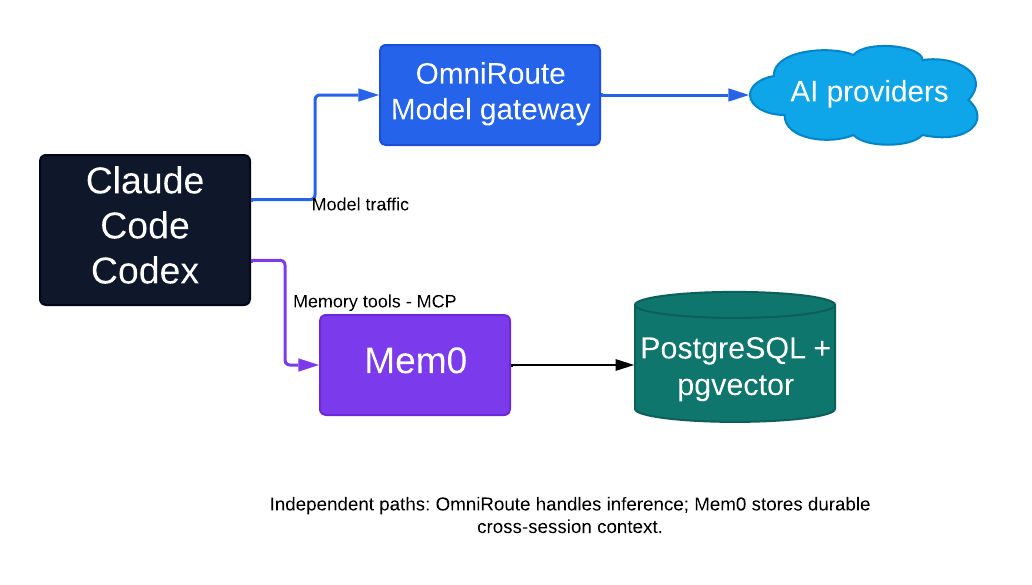
This guide installs a self-hosted development stack with Docker Compose: OmniRoute model routing with shared Mem0 memory for Claude Code and Codex. All the Compose and MCP bridge files live in the ai-developer-stack repository on GitHub.
The model and memory paths are deliberately separate. OmniRoute handles model traffic, provider credentials, routing, and fallback. Mem0 stores durable cross-session context. A small MCP bridge exposes self-hosted Mem0 operations to Claude Code and Codex.
The stack also includes Bifrost as an optional Compose profile. Do not enable it for the initial installation. Add it later only when you need its higher-throughput data plane, caching, governance, or observability.
1. What the stack deploys
| Service | Purpose | Default host address |
|---|---|---|
| OmniRoute | Model gateway and dashboard | http://localhost:20128 |
| OmniRoute Redis | Rate limiter and shared cache | Internal only |
| Mem0 dashboard | User, API-key, request, and memory management | http://localhost:3000 |
| Mem0 API | Self-hosted memory REST API | http://localhost:8888 |
| Mem0 MCP bridge | Streamable HTTP tools for coding agents | http://localhost:8765/mcp |
| PostgreSQL + pgvector | Mem0 application and vector storage | Internal only |
| Bifrost | Optional OmniRoute data plane | Internal only; disabled initially |
All published ports bind to 127.0.0.1 by default. This is intentional: it prevents another machine from reaching an unauthenticated development service. Remote-access options are covered later.
2. Prerequisites
Install these on the Docker host:
- Docker Engine 24 or later, or a current Docker Desktop release.
- Docker Compose v2 (
docker compose, not the retireddocker-composePython tool). - Git.
- Approximately 8 GB of free memory and 15 GB of free disk space for images, builds, and persistent data.
- An API key supported by the self-hosted Mem0 server. This guide uses OpenAI for Mem0 extraction and embeddings.
- At least one provider account or API key to configure in OmniRoute.
Claude Code and Codex run on the developer workstation, not inside this Compose stack. The workstation may be the same machine as the Docker host.
Check the required tools:
docker --version
docker compose version
git --version
3. Create the installation directory
Clone the stack repository and enter it:
git clone https://github.com/allistera/ai-developer-stack.git
cd ai-developer-stack
Clone the Mem0 source tree into the location expected by compose.yaml:
git clone https://github.com/mem0ai/mem0.git vendor/mem0For a repeatable production installation, check out a reviewed release tag or commit instead of following main indefinitely:
git -C vendor/mem0 tag --sort=-version:refname | head
git -C vendor/mem0 checkout YOUR_REVIEWED_TAG_OR_COMMIT
The resulting directory should look like this:
ai-developer-stack/
├── compose.yaml
├── .env.example
├── README.md
├── mcp-bridge/
│   ├── Dockerfile
│   ├── requirements.txt
│   └── server.py
└── vendor/
    └── mem0/
4. Configure the environment
Create the private environment file:
cp .env.example .envGenerate the database, Mem0 JWT, and OmniRoute WebSocket secrets:
openssl rand -hex 32
openssl rand -base64 48
openssl rand -hex 32
Open .env and replace the corresponding CHANGE_ME values:
POSTGRES_PASSWORD=generated-database-password
MEM0_JWT_SECRET=generated-jwt-secret
OMNIROUTE_WS_BRIDGE_SECRET=generated-websocket-secret
MEM0_OPENAI_API_KEY=your-provider-api-key
Keep the initial local URL settings unchanged:
STACK_BIND_ADDRESS=127.0.0.1
OMNIROUTE_PUBLIC_URL=http://localhost:20128
OMNIROUTE_AUTH_COOKIE_SECURE=false
MEM0_DASHBOARD_URL=http://localhost:3000
MEM0_PUBLIC_API_URL=http://localhost:8888
BIFROST_ENABLED=false
MEM0_OPENAI_API_KEY is used by Mem0 for fact extraction and embeddings. Provider credentials used for normal Claude Code and Codex model requests are configured separately in OmniRoute. Keeping those credentials separate makes failures easier to isolate.
Leave MEM0_API_KEY empty for now. It will be created in the Mem0 dashboard after the core services start.
Protect the environment file:
chmod 600 .env5. Validate and start the core stack
Validate Compose interpolation and YAML structure:
docker compose config --quietBuild Mem0 and start the default services:
docker compose up -d --buildThe optional memory-tools and bifrost profiles do not start yet.
Watch startup status:
docker compose ps
docker compose logs --tail=100 omniroute mem0-api mem0-dashboard postgres
Basic health checks:
curl -fsS http://localhost:8888/openapi.json >/dev/null
curl -fsS http://localhost:3000/api/health
curl -fsS http://localhost:20128 >/dev/null
The Mem0 API health probe intentionally uses /openapi.json. /api/health belongs to the dashboard and returns 404 when sent to the Mem0 API.
6. Configure OmniRoute
Open http://localhost:20128. Complete the OmniRoute first-run flow, then:
- Add the provider accounts or API keys you want OmniRoute to use.
- Confirm at least one model appears and can answer a test request.
- Configure routing or fallback rules if required.
- Open Dashboard → API Manager.
- Create an API key for your coding clients and copy it immediately.
Test the OpenAI-compatible model catalog with that key:
export OMNIROUTE_API_KEY='replace-with-your-omniroute-key'

curl -fsS http://localhost:20128/v1/models \
  -H "Authorization: Bearer ${OMNIROUTE_API_KEY}"
Record an exact model ID returned by OmniRoute. Codex will use that value later.
7. Configure Mem0 and start the MCP bridge
Open http://localhost:3000. The one-time setup wizard should appear. Complete it as follows:
- Register the first administrator.
- Review the LLM and embedder configuration.
- Create a per-user Mem0 API key.
- Copy the full
m0sk_...key when it is displayed. - Complete the test-memory step.
Edit .env and set:
MEM0_API_KEY=PASTE_MEM0_KEY_HERE
MEM0_DEFAULT_USER_ID=developer
Use one stable MEM0_DEFAULT_USER_ID across Claude Code and Codex. It is the shared memory namespace, not a login name.
Start the MCP bridge profile:
docker compose --profile memory-tools up -d --build mem0-mcp
docker compose ps mem0-mcp
docker compose logs --tail=100 mem0-mcp
The bridge exposes these tools:
add_memorysearch_memoriesget_memoriesget_memoryupdate_memorydelete_memory
8. Install and configure Claude Code
Install Claude Code using Anthropic’s current installation instructions. On macOS or Linux, the current native installer is:
curl -fsSL https://claude.ai/install.sh | bashRoute Claude Code model traffic through OmniRoute
Claude Code uses the Anthropic-compatible root without a /v1 suffix. Merge the following values into ~/.claude/settings.json; preserve any settings already present:
{
  "env": {
    "ANTHROPIC_BASE_URL": "http://localhost:20128",
    "ANTHROPIC_AUTH_TOKEN": "replace-with-your-omniroute-key"
  }
}
Do not commit this file or copy its token into a repository.
Test model routing:
claude "Reply with: OmniRoute is working"Add shared Mem0 memory
Register the MCP bridge at user scope so it is available in every Claude Code project on this workstation:
claude mcp add \
  --scope user \
  --transport http \
  mem0 \
  http://localhost:8765/mcp
Verify it:
claude mcp list
claude mcp get mem0
9. Install and configure Codex
Install Codex using OpenAI’s current native installer:
curl -fsSL https://chatgpt.com/codex/install.sh | shExport the OmniRoute API key through your shell or preferred secret manager:
export OMNIROUTE_API_KEY='replace-with-your-omniroute-key'If you start the Codex desktop app from a graphical launcher, confirm that the application inherits this environment variable. Starting it from the configured shell is the simplest initial test.
Edit the user-level ~/.codex/config.toml. Merge these sections with anything already present:
model = "MODEL_ID_RETURNED_BY_OMNIROUTE"
model_provider = "omniroute"

[model_providers.omniroute]
name = "OmniRoute"
base_url = "http://localhost:20128/v1"
env_key = "OMNIROUTE_API_KEY"
wire_api = "responses"

[mcp_servers.mem0]
url = "http://localhost:8765/mcp"
enabled = true
required = false
startup_timeout_sec = 20
tool_timeout_sec = 60
The provider configuration belongs in the user-level file. Current Codex intentionally ignores credential-redirecting provider settings in repository-level .codex/config.toml files.
Verify the memory connection:
codex mcp listThen start Codex and send a small test prompt. If the selected model fails, verify that OmniRoute exposes /v1/responses for that route and that the model ID exactly matches the catalog.
10. Tell both agents when to use memory
MCP availability does not guarantee proactive use. Add durable instructions to the appropriate agent guidance files.
Claude Code: CLAUDE.md
## Persistent memory

Use the shared Mem0 MCP server for durable cross-session context.

Before substantial work:

- Search memories for the repository, component, and task.
- Look for architectural decisions, conventions, known problems, and preferences.
- Search across agent IDs so memories created by Codex remain visible.

After meaningful work:

- Save only confirmed decisions, reusable debugging findings, conventions, and constraints.
- Use the repository name as `project` and `claude-code` as `agent_id` when writing.
- Update outdated memories instead of creating contradictions.
- Never store credentials, secrets, raw logs, temporary output, or speculation.
Codex: AGENTS.md
## Persistent memory

Use the shared `mem0` MCP server for durable cross-session context.

Before substantial work:

- Search memories for the repository, component, and task.
- Look for architectural decisions, conventions, known problems, and preferences.
- Search across agent IDs so memories created by Claude Code remain visible.

After meaningful work:

- Save only confirmed decisions, reusable debugging findings, conventions, and constraints.
- Use the repository name as `project` and `codex` as `agent_id` when writing.
- Update outdated memories instead of creating contradictions.
- Never store credentials, secrets, raw logs, temporary output, or speculation.
Repository documentation remains authoritative. Store operating instructions in AGENTS.md, CLAUDE.md, ADRs, and README files. Use Mem0 for cross-tool context and the reasoning behind durable decisions.
11. Verify cross-client memory
In Claude Code, ask:
Use Mem0 to remember that project memory-stack-test uses pnpm and Vitest. Set project to memory-stack-test and agent_id to claude-code.
In Codex, ask:
Search shared Mem0 memory for package-manager and test-framework decisions for memory-stack-test. Search across agent IDs.
Then test the reverse direction in Codex:
Remember that memory-stack-test requires Node.js 24. Set project to memory-stack-test and agent_id to codex.
Ask Claude Code to search for the runtime requirement. Finally, confirm the records appear in the Mem0 dashboard.
12. Remote HTTPS deployment
For remote clients, place an authenticated HTTPS reverse proxy or zero-trust tunnel in front of the services. A typical mapping is:
https://ai.example.com         → http://127.0.0.1:20128
https://memory.example.com     → http://127.0.0.1:3000
https://memory-api.example.com → http://127.0.0.1:8888
https://memory-mcp.example.com → http://127.0.0.1:8765
Update .env with the exact public origins, without trailing slashes:
OMNIROUTE_PUBLIC_URL=https://ai.example.com
OMNIROUTE_LIVE_WS_ALLOWED_ORIGINS=https://ai.example.com
OMNIROUTE_AUTH_COOKIE_SECURE=true
MEM0_DASHBOARD_URL=https://memory.example.com
MEM0_PUBLIC_API_URL=https://memory-api.example.com
Apply the changes by recreating the affected containers:
docker compose up -d --force-recreate omniroute mem0-api mem0-dashboard
docker compose --profile memory-tools up -d --force-recreate mem0-mcp
Use the HTTPS URLs in Claude Code and Codex configuration. Claude Code’s OmniRoute URL remains the origin root; Codex’s model provider URL ends in /v1; both MCP URLs end in /mcp.
Important security rules:
- Keep
STACK_BIND_ADDRESS=127.0.0.1when the reverse proxy runs on the host. - If the reverse proxy runs in Docker, attach it to the relevant Compose networks or use carefully firewalled host bindings.
- Do not expose PostgreSQL, Redis, or Bifrost publicly.
- The MCP bridge in this stack authenticates to Mem0 but does not authenticate incoming MCP clients. Keep it local or protect it with an authenticated reverse proxy, VPN, or zero-trust access policy.
- Mem0 CORS allows exactly
MEM0_DASHBOARD_URL. A mismatch in scheme, hostname, port, or trailing slash can break registration and login. - After changing hostnames, clear old browser site data and use only the canonical HTTPS dashboard URL.
13. Operations
View status and logs
docker compose ps
docker compose logs --tail=200 omniroute
docker compose logs --tail=200 mem0-api mem0-dashboard mem0-mcp
Back up Mem0 PostgreSQL
mkdir -p backups
docker compose exec -T postgres \
  pg_dumpall -U "${POSTGRES_USER:-postgres}" \
  > "backups/mem0-$(date +%Y-%m-%d).sql"
Back up OmniRoute data
docker run --rm \
  -v ai-developer-stack_omniroute-data:/source:ro \
  -v "$PWD/backups:/backup" \
  alpine \
  sh -c 'tar -czf /backup/omniroute-data.tar.gz -C /source .'
Update the stack
Back up first, then:
git -C vendor/mem0 pull --ff-only
docker compose pull
docker compose build --pull mem0-api mem0-dashboard mem0-mcp
docker compose --profile memory-tools up -d
If Bifrost is enabled, include --profile bifrost in the final command.
Reset everything
The following destroys all memories, users, API keys, provider configuration, and OmniRoute state:
docker compose --profile memory-tools --profile bifrost down -vRun it only after taking backups and confirming that a full reset is intended. Then repeat the installation from the core-stack startup step.
14. Troubleshooting
Mem0 API is unhealthy
Confirm the API itself answers:
curl -i http://localhost:8888/openapi.jsonUse /openapi.json, not /api/health.
Mem0 registration is blocked by CORS
Check that the browser’s dashboard origin exactly matches MEM0_DASHBOARD_URL, for example MEM0_DASHBOARD_URL=https://memory.example.com. Then recreate mem0-api. A reverse-proxy 502 on an OPTIONS request is an origin-routing failure, not an application CORS rule.
Mem0 accepts login but stays on the login page
Confirm the dashboard and API public URLs use the same canonical scheme and hostnames configured in .env. For HTTPS, OMNIROUTE_AUTH_COOKIE_SECURE affects OmniRoute, while Mem0 derives its dashboard session behavior from MEM0_DASHBOARD_URL. Rebuild or recreate the dashboard and clear stale browser cookies.
The MCP URL returns an error in a browser
Streamable HTTP MCP is a protocol endpoint, not a normal web page. A browser GET may return 405 or 406. Verify it through claude mcp list, claude mcp get mem0, or codex mcp list instead.
Codex cannot use the selected model
- Confirm the model ID exists in
GET /v1/models. - Confirm the OmniRoute route supports the Responses API.
- Keep
wire_api = "responses"in current Codex configuration. - Confirm
OMNIROUTE_API_KEYis available to the Codex process.
The MCP bridge reports 401
Create a new per-user API key in the Mem0 dashboard, update MEM0_API_KEY in .env, and recreate the bridge:
docker compose --profile memory-tools up -d --force-recreate mem0-mcpFinished result
You should now have:
- OmniRoute dashboard:
http://localhost:20128, routing model traffic for both agents - Mem0 dashboard:
http://localhost:3000 - Mem0 MCP bridge:
http://localhost:8765/mcp, registered in Claude Code and Codex - One shared memory namespace, readable and writable from both agents
- Stack sources: github.com/allistera/ai-developer-stack
Keep the stack bound to loopback until you need remote access, and take the PostgreSQL and OmniRoute backups before every update.