
An AI agent with a browser is useful. An AI agent with my browser is a liability.
Once an agent can open a URL chosen by a model, it is running untrusted code from the web. Pages ship JavaScript, downloads land on disk, and a prompt injection in a page can try to turn the browser against anything else the agent can reach. Running that browser on my workstation, or next to production, puts the blast radius in the wrong place.
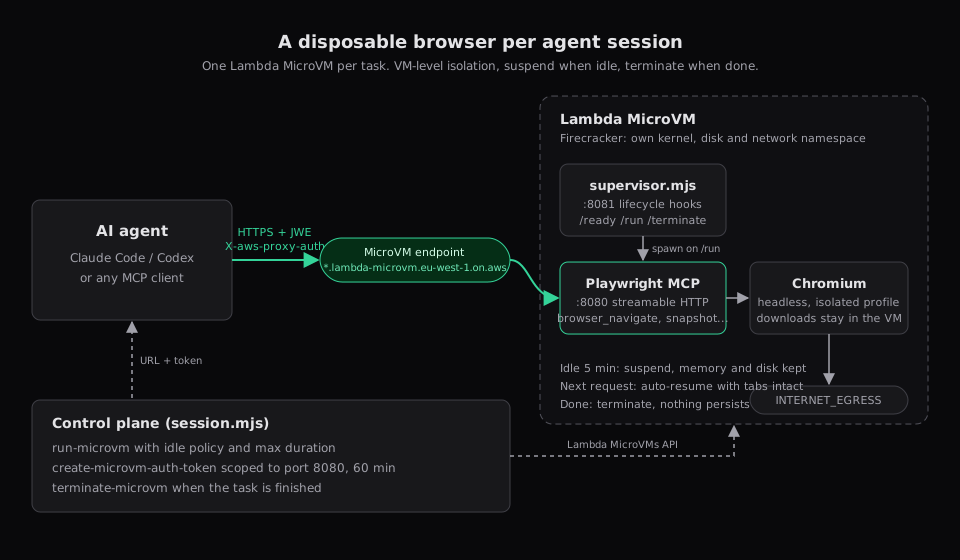
So I give the agent a browser it is allowed to break. Each session gets its own AWS Lambda MicroVM: a Firecracker virtual machine with its own kernel, disk and network. Inside it, headless Chromium runs behind the Playwright MCP server. Claude Code connects over HTTPS with a short-lived token, the MicroVM suspends when the agent goes quiet, and I terminate it when the job is done.
1. Why a MicroVM
Lambda MicroVMs became generally available in June 2026. They expose the Firecracker virtualisation that has run Lambda functions for years as something you control directly: build an image, run MicroVMs from it, talk to each one at its own HTTPS endpoint, and suspend, resume or terminate it on demand.
Three properties matter for a browser:
| Property | Why it matters here |
|---|---|
| VM-level isolation | A renderer exploit or malicious download is trapped inside a guest with its own kernel. The worst case is a VM you were about to delete anyway. |
| Snapshot launch | MicroVMs start from a snapshot of an initialised image, so a session is ready in seconds. |
| Suspend and resume | When the agent is thinking, the VM suspends with memory and disk intact and compute charges stop. Tabs are still there when traffic returns, for up to 8 hours. |
Containers share the host kernel. That is fine for code you wrote. It is a poor boundary for a browser whose next destination is chosen at runtime by a language model.
If you want zero plumbing, Amazon Bedrock AgentCore Browser is the managed version of this idea. The MicroVM route is for when you want the browser image, egress and cost model in your own account.
2. The pieces
- MicroVM image: Playwright’s official arm64 container image, the Playwright MCP package, and a short supervisor script.
- Supervisor on port 8081: answers the MicroVM lifecycle hooks. It starts Playwright MCP when the
/runhook fires and stops it on/terminate. - Playwright MCP on port 8080: what the agent talks to. It exposes
browser_navigate,browser_snapshot,browser_clickand friends over HTTP, and launches Chromium on the first tool call. - A small script on your laptop: runs a MicroVM, mints a token for port 8080, prints the MCP URL, and terminates the session later.
Tokens are scoped to port 8080, so the agent can never reach the hook port.
3. Prerequisites
- An AWS account in a Region with Lambda MicroVMs. I use
eu-west-1. - A recent AWS CLI v2 with the
lambda-microvmscommand group. - An S3 bucket in the same Region for the build artifact.
- Node.js 22 or later on your workstation.
- An IAM build role that Lambda can assume. Its trust policy allows
lambda.amazonaws.comto callsts:AssumeRoleandsts:TagSession, and its permissions allows3:GetObjecton your bucket pluslogs:CreateLogGroup,logs:CreateLogStreamandlogs:PutLogEvents.
4. Build the browser image
Create a directory with three files.
package.json
{
  "name": "agent-browser",
  "private": true,
  "type": "module",
  "dependencies": {
    "@playwright/mcp": "0.0.83"
  }
}
Dockerfile
FROM mcr.microsoft.com/playwright:v1.64.1-noble

WORKDIR /app
COPY package.json supervisor.mjs ./

# Playwright MCP pins its own Playwright build, so install the matching Chromium.
RUN npm install --omit=dev \
 && npx playwright install chromium \
 && chown -R pwuser:pwuser /app

USER pwuser
EXPOSE 8080 8081
CMD ["node", "supervisor.mjs"]
The Playwright image already has every library Chromium needs on arm64, which saves a long and fragile package list on Amazon Linux. The FROM line only defines the application container. The MicroVM operating system comes from the Lambda-managed base image passed at build time.
supervisor.mjs
import http from 'node:http';
import net from 'node:net';
import { spawn } from 'node:child_process';

let browser = null;

function waitForPort(port) {
  return new Promise((resolve) => {
    const attempt = () => {
      const socket = net.connect(port, '127.0.0.1');
      socket.once('connect', () => { socket.destroy(); resolve(); });
      socket.once('error', () => { socket.destroy(); setTimeout(attempt, 250); });
    };
    attempt();
  });
}

const hooks = {
  '/aws/lambda-microvms/runtime/v1/ready': async () => {},
  '/aws/lambda-microvms/runtime/v1/run': async () => {
    browser = spawn('node_modules/.bin/playwright-mcp', [
      '--port', '8080',
      '--host', '0.0.0.0',
      '--allowed-hosts', '*',
      '--headless',
      '--isolated',
      '--no-sandbox',
      '--output-dir', '/tmp/output',
    ], { stdio: 'inherit' });
    await waitForPort(8080);
  },
  '/aws/lambda-microvms/runtime/v1/terminate': async () => { browser?.kill('SIGTERM'); },
};

http.createServer((req, res) => {
  const handler = hooks[req.url];
  if (req.method !== 'POST' || !handler) return res.writeHead(404).end();
  req.on('data', () => {}).on('end', async () => {
    try { await handler(); res.writeHead(200).end(); }
    catch (error) { console.error(error); res.writeHead(500).end(); }
  });
}).listen(8081, () => console.log('hooks listening on 8081'));
The browser is started in the /run hook rather than baked into the image. Lambda snapshots whatever is running when the build finishes, and every MicroVM resumes from that identical memory. A browser inside the snapshot would share its random state and profile across every session. Starting the MCP server after launch costs about a second.
Two flags need a word. Playwright MCP rejects requests whose Host header does not match its bind address, and requests arrive carrying the MicroVM endpoint hostname, so --allowed-hosts '*' is required. The real access control is the token Lambda checks before anything reaches the VM. And Chromium’s own sandbox needs kernel features the application container does not grant by default, so it runs with --no-sandbox. Inside a disposable VM that is an acceptable trade. On a shared host it would not be.
Zip and upload the files, then create the image:
zip agent-browser.zip Dockerfile package.json supervisor.mjs
aws s3 cp agent-browser.zip s3://YOUR_BUCKET/agent-browser.zip

aws lambda-microvms create-microvm-image \
  --region eu-west-1 \
  --name agent-browser \
  --code-artifact uri=s3://YOUR_BUCKET/agent-browser.zip \
  --base-image-arn arn:aws:lambda:eu-west-1:aws:microvm-image:al2023-1 \
  --build-role-arn arn:aws:iam::123456789012:role/MicrovmBuildRole \
  --cpu-configurations architecture=ARM_64 \
  --resources minimumMemoryInMiB=2048 \
  --hooks 'port=8081,microvmImageHooks={ready=ENABLED,readyTimeoutInSeconds=120},microvmHooks={run=ENABLED,runTimeoutInSeconds=60,terminate=ENABLED,terminateTimeoutInSeconds=10}'
Lambda runs the Dockerfile, starts the supervisor, calls /ready, then snapshots the disk and memory. Poll until the state is CREATED:
aws lambda-microvms get-microvm-image --region eu-west-1 \
  --image-identifier agent-browser --query '{state:state,arn:imageArn}'
If it fails, the build logs are in CloudWatch under /aws/lambda-microvms/agent-browser.
A 2 GB, 1 vCPU baseline is the default and is enough for one headless Chromium. MicroVMs burst to four times the baseline when a heavy page needs it, and you only pay for the burst while it lasts.
5. Run a session and connect Claude Code
A session is three API calls: run a MicroVM, mint a token, and terminate it later. This script does them with the AWS SDK.
mkdir agent-browser-control && cd agent-browser-control
npm init -y && npm install @aws-sdk/client-lambda-microvms
session.mjs
import {
  LambdaMicrovmsClient,
  RunMicrovmCommand,
  GetMicrovmCommand,
  CreateMicrovmAuthTokenCommand,
  TerminateMicrovmCommand,
} from '@aws-sdk/client-lambda-microvms';

const region = 'eu-west-1';
const client = new LambdaMicrovmsClient({ region });
const connector = (name) => `arn:aws:lambda:${region}:aws:network-connector:aws-network-connector:${name}`;
const [command, microvmArg] = process.argv.slice(2);

if (command === 'start') {
  const { microvmId } = await client.send(new RunMicrovmCommand({
    imageIdentifier: process.env.IMAGE_ARN,
    ingressNetworkConnectors: [connector('ALL_INGRESS')],
    egressNetworkConnectors: [connector('INTERNET_EGRESS')],
    idlePolicy: { autoResumeEnabled: true, maxIdleDurationSeconds: 300, suspendedDurationSeconds: 7200 },
    maximumDurationInSeconds: 14400,
  }));

  let vm;
  do {
    await new Promise((resolve) => setTimeout(resolve, 1000));
    vm = await client.send(new GetMicrovmCommand({ microvmIdentifier: microvmId }));
  } while (vm.state === 'PENDING');
  if (vm.state !== 'RUNNING') throw new Error(`${microvmId} is ${vm.state}: ${vm.stateReason}`);

  const { authToken } = await client.send(new CreateMicrovmAuthTokenCommand({
    microvmIdentifier: microvmId,
    expirationInMinutes: 60,
    allowedPorts: [{ port: 8080 }],
  }));

  console.log(`export MICROVM_ID=${microvmId}`);
  console.log(`export MICROVM_URL=https://${vm.endpoint}/mcp`);
  console.log(`export MICROVM_TOKEN=${authToken['X-aws-proxy-auth']}`);
} else if (command === 'stop') {
  await client.send(new TerminateMicrovmCommand({ microvmIdentifier: microvmArg }));
  console.log(`terminated ${microvmArg}`);
}
Start a session, then hand the URL and token to Claude Code:
export IMAGE_ARN=arn:aws:lambda:eu-west-1:123456789012:microvm-image:agent-browser
eval "$(node session.mjs start)"

claude mcp add --transport http browser "$MICROVM_URL" \
  --header "X-aws-proxy-auth: $MICROVM_TOKEN"
That is the whole integration. Ask Claude Code to open a page, take a snapshot or fill in a form, and it happens inside the MicroVM. Screenshots come back as tool results. Downloads stay on the VM.
Any other MCP client works the same way: point it at the URL and send the X-aws-proxy-auth header. Tokens last at most 60 minutes, so for a long session mint a new one with create-microvm-auth-token and reconnect.
The idle policy suspends the VM after five minutes without traffic, keeps the suspended state for two hours, then terminates it. The four-hour maximum means a forgotten session cannot run all day. Always set both.
6. Pause, resume, stop
After five minutes of silence Lambda checkpoints the VM and stops charging for compute. Chromium is frozen with every tab and cookie in place. The agent’s next tool call resumes the VM, adds a few seconds to that one request, and then everything is back to normal speed.
When you are done:
node session.mjs stop "$MICROVM_ID"
claude mcp remove browser
Termination releases everything and stops all charges. Nothing from the session survives.
7. Cost and safety in brief
At US East arm64 list prices in October 2026, a 2 GB browser costs about 13 cents per hour while running, under a cent to suspend and resume, and nothing while suspended beyond trivial snapshot storage. An hour-long session where the agent browses for 20 minutes costs a few cents. Check the Lambda pricing page before planning around those numbers.
On safety, the setup above is already far better than a local browser. Four habits keep it that way:
- One MicroVM per task. The isolation argument only holds if sessions never share a VM, and the pricing makes that cheap.
- Short, port-scoped tokens. Mint them for the length of the task.
- No execution role unless the browser genuinely needs AWS access. Then a compromised browser has no credentials to steal.
- Control egress in the network if it matters. Attach a VPC egress connector and filter there. Browser-level origin lists are advice, not enforcement.
I now treat agent browsing the way I treat CI runners: a fresh, isolated environment per job, paused when idle and gone afterwards. Lambda MicroVMs give you that without running a Firecracker fleet yourself, and the result is a browser nobody has to trust.